|
- Has the features that most people need
and is FREE.
- Has all the features of
FreeMeter plus features intended for power users and system administrators.
|
 |
 |
| |
| | FreeMeter | FreeMeter Professional | | - Runs on Windows Vista, 2003, XP, 2000, ME, 98, NT4, 95b. Works with all language versions. It has not been tested on 64-bit versions of Windows. (for a note on Vista compatibility see the FAQ) |  |  | |
|
 |
 |
|
 |
 |
| |
| | FreeMeter | FreeMeter Professional | | - Monitor the disk space usage of local and server volumes. Display information in megabytes or gigabytes. |  |  | | - Find out how busy your processor really is. |  |  | | - Monitor processors separately or combined on systems with up to 4 CPUs. |  |  on Windows NT, 2000, XP, Vista | | - Monitors free GDI, User and System resources. |  Windows 95b, 98 & ME only |  Windows 95b, 98 & ME only | | - Two meters, one graphical and one text based, let you keep an eye on your memory use and help you discover if you have enough. |  |  | | - Two meters, one graphical and one text based, let you keep an eye on your page file usage. |  |  | | - Indicates the rate at which pages are read from or written to disk to resolve hard page faults. This meter is a primary indicator of the kinds of faults that cause system-wide delays. |  |  on Windows NT, 2000, XP, Vista | | - Monitors the amount of memory currently in use by the system file cache. The system cache is used to buffer data retrieved from disk or LAN. The system cache uses memory not in use by active processes in the computer. |  |  on Windows NT, 2000, XP, Vista | | - On Windows 95b/98/ME, this meter monitors most traffic to and from the file server service. On Windows NT 4, Windows 2000, and Windows XP, this meter monitors most TCP/IP traffic. Up to two network meters can be displayed. |  |  | | - Graphs the performance of reads and writes to all your local hard disks. |  |  | | - Get a list of running processes, including how much CPU time and memory they are using. |  |  on Windows NT, 2000, XP, Vista | | - Ping a list of hosts to determine which are up and how quickly they are responding. |  |  | | - Displays the amount of time that system has been running. |  |  | |
|
 |
 |
|
 |
 |
| |
| These alerts are triggered when the free space on a monitored disk volume drops below a specified amount. Click here for a screen shot of the alert preferences. | | | FreeMeter | FreeMeter Professional | | - The icon for the drive will change from green to red. |  |  | | - Play a built-in sound or an external sound file. |  |  | | - Run any application. The application can be passed a number of parameters related to the drive. |  |  | | - Send an email using an SMTP server. The email can contain information related to the drive. |  |  | |
|
 |
 |
|
 |
 |
| |
| These alerts are triggered when a server being monitored by the Network Ping meter fails to respond to a ping. Click here for a screen shot of the alert preferences. | | | FreeMeter | FreeMeter Professional | | - Play a built-in sound or an external sound file. |  |  | | - Run any application. The application can be passed a number of parameters related to the down server. |  |  | | - Send an email using an SMTP server. The email can contain information related to the down server. |  |  | |
|
 |
 |
|
 |
 |
| |
| These alerts are triggered when CPU usage goes above a set rate for a specified period of time. Click here for a screen shot of the alert preferences. | | | FreeMeter | FreeMeter Professional | | - Play a built-in sound or an external sound file. |  |  | | - Run any application. The application can be passed a number of parameters related to the CPU alert. |  |  | | - Send an email using an SMTP server. The email can contain information related to the CPU alert. |  |  | |
|
 |
 |
|
 |
 |
| |
| These alerts are triggered when the amount of free physical or page file memory drops below a set level for a specified period of time. Click here for a screen shot of the alert preferences. | | | FreeMeter | FreeMeter Professional | | - Play a built-in sound or an external sound file. |  |  | | - Run any application. The application can be passed a number of parameters related to the memory alert. |  |  | | - Send an email using an SMTP server. The email can contain information related to the memory alert. |  |  | |
|
 |
 |
|
 |
 |
| |
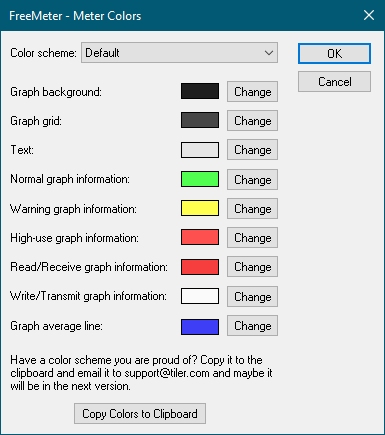
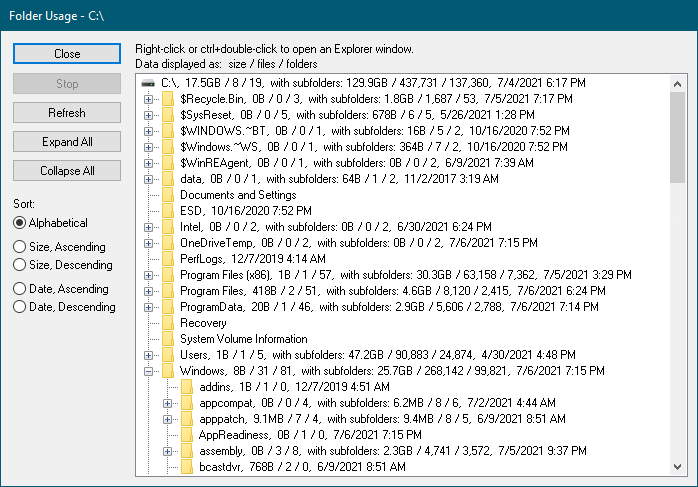
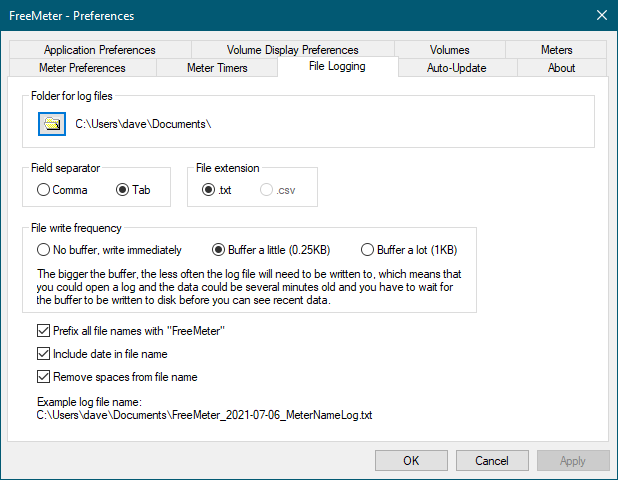
| | FreeMeter | FreeMeter Professional | | - Find out how much space is being used by the folders on a disk. |  |  | | - Move, copy, delete and hide folders right from the folder usage dialog. |  |  | | - A new pane is added to the properties dialog that displays folder usage information. (screen shot) |  |  | | - Monitor the CPU, Disk and Network activity as well as the uptime and process list of remote computers. (Computers running XP Home can not be monitored remotely.) (screen shot) |  |  on Windows NT, 2000, XP, Vista | | - Write meter usage information to a text file. (screen shot, sample logs) |  |  | | - Hook up an external LCD display to your computer to display FreeMeter information. The display can be mounted in an open drive bay in your computer so that you can always see your system status at a glance. Click here for more information. (LCD display purchased separately.) |  |  | | - Check and read your email. Click here for more information. |  |  | | - Display icons in the system tray that show current disk space usage, cpu usage or memory usage. |  |  | | - Graphs can be either bar graphs or line graphs. |  |  | | - Right click a meter to move it up or down in the arrangement. |  |  | |  |  | | - Initiate system hibernation mode, stand-by mode, logoff, restart, or shutdown from a FreeMeter system tray icon. |  |  | | - Change the colors of all the meters to a predefined scheme or choose your own colors (screen shot). Also control when bar graph lines change color to alert you to heavy use. |  |  | | - Assign a hot key to quickly activate FreeMeter and bring it to the top. |  |  | | - Change the alignment and format of the text under a meter. |  |  | | - Set two transparency levels for the meter window, one for when the application is in the foreground and another for when it is in the background. |  |  on Windows 2000, XP, Vista | | - Drive meter data can be copied to the clipboard. |  |  | | - Physical Memory and Page File meters work correctly on systems with more than 2GB of physical memory or more than 4GB of page file space. |  |  on Windows 2000, XP, Vista | | - Memory meters can be displayed in a small or large font. |  small only |  | | - Fully compatible with remote access software such as VNC or PCAnywhere. |  |  | | - Automatically checks my server for program updates and can automatically download the new version. |  |  | |
|
 |
 |
|
 |
 |
| |
| | FreeMeter | FreeMeter Professional | | - Free updates that include bug fixes and some new features. Major upgrades (such as v3.0) may have an upgrade fee associated with them. |  |  | | - Access to early betas to test new features and supply feedback. |  |  | | - Single user license. | FREE | $28.49 more info | |
|
 |
 |
|
|